

For small business invoice intake

Check e-invoices.
Clarify the next step.

For companies still collecting invoices by email: review technical findings, prepare clarification and hand eligible e-invoices to your tax adviser.

No credit card. Charges only begin after your explicit paid order.

14-day free trial, no credit card. Plans from €9.99 per month plus VAT – offer exclusively for businesses (Unternehmer) within the meaning of Section 14 BGB.

Illustrative work scene: a florist handles supplier administration on an open laptopIllustrative scene · AI-generated
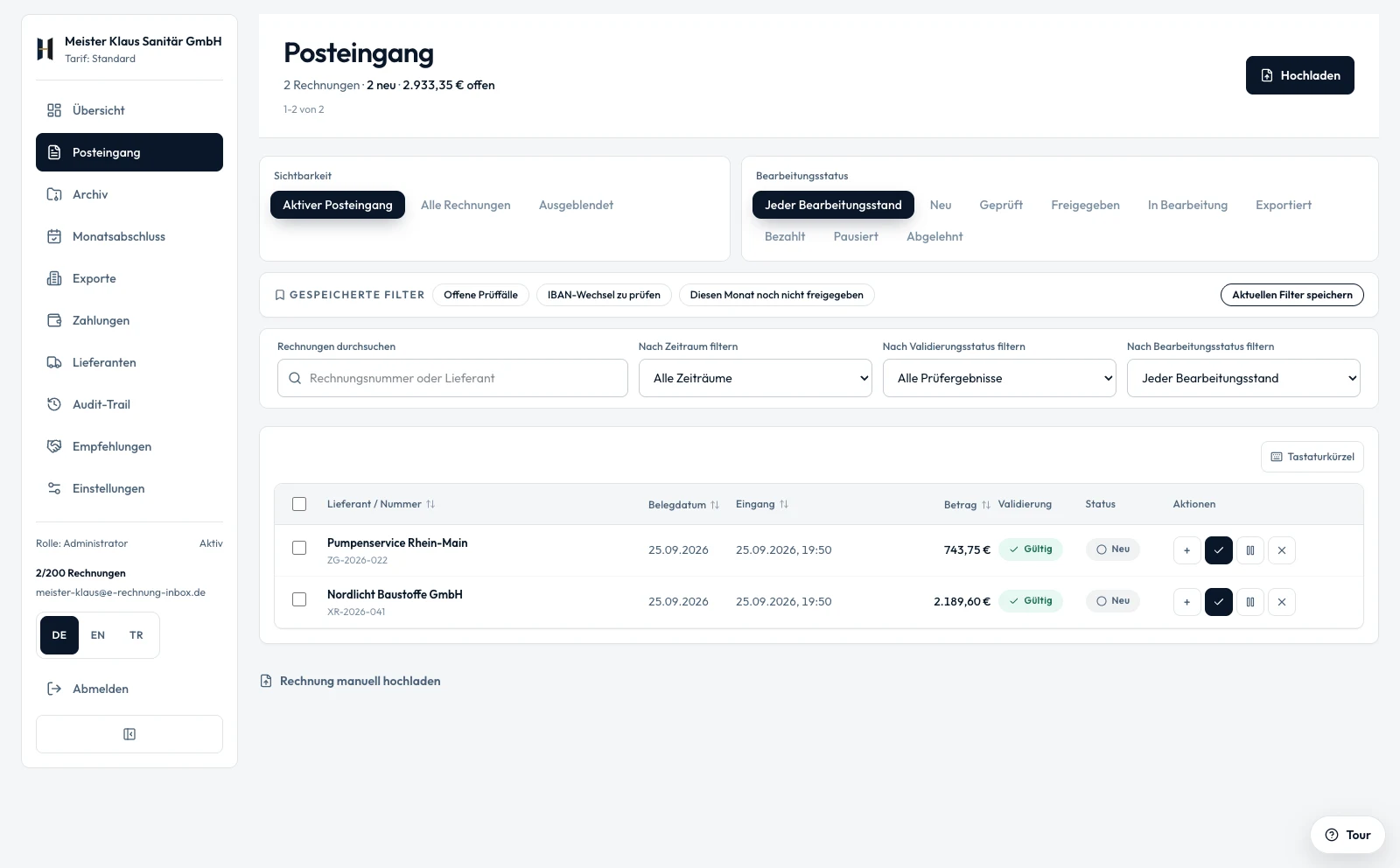
e-Rechnung Inbox · Product viewSample data
Actual inbox interface with sample data
Real product interface with sample data. Screenshot taken on 25 September 2026.
Before bookkeeping

Understand the issue. Know the next step. Prepare the handover.

One possible workflow for a technical issue. You retain responsibility for the substantive review and decide what goes to your tax adviser.

  1. 01

    See the issue

    A supported e-invoice is not ready for export yet. Its invoice data, report and reason remain together in the same record.

  2. 02

    Prepare the clarification

    Read the report and request a corrected file from the supplier if needed. Review and copy the message template; you send the message yourself.

  3. 03

    Hand over with control

    Check the corrected invoice again and approve its content. Prepare eligible e-invoices as DATEV CSV/EXTF or an adviser package; your adviser imports the files.

What the handover includes

  • Plain PDF receipts are accepted, but are not checked with KoSIT and are not part of the adviser package.
  • Starter includes individual invoice exports. Bulk export and archive ZIP are included from Standard.
  • Direct transfer to DATEV Unternehmen online and the sevdesk connection are in preparation. The available handover uses files.
See the available DATEV handover
Before bookkeeping

See the application.

Explore a clear workflow before you register.

Actual inbox interface with sample data

Inbox · actual product interface with sample data, captured on 25 September 2026.

Illustrative work scene: a ceramicist wraps a finished mug in protective packing paperIllustrative scene · AI-generated
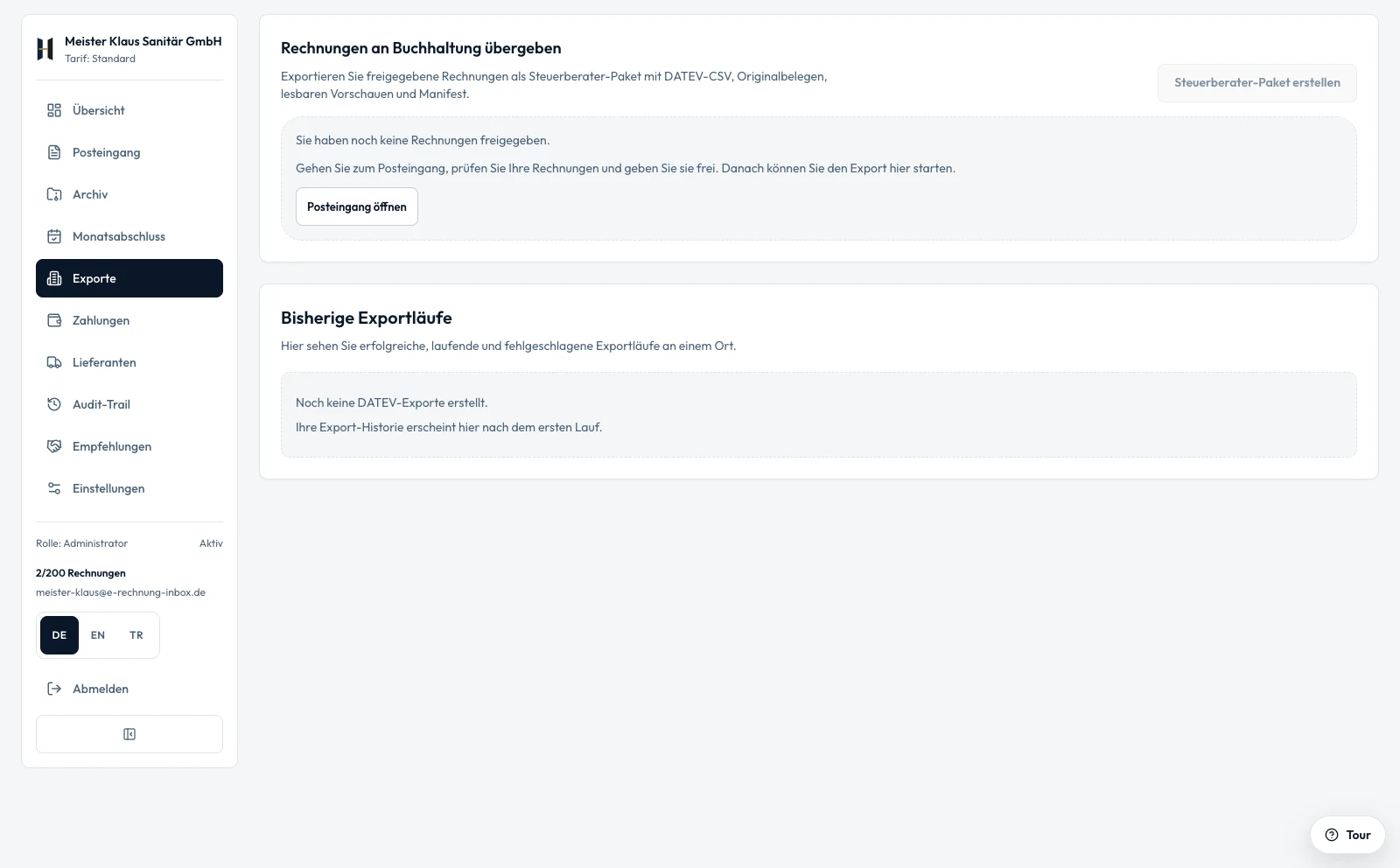
Actual export overview with sample data
Export overview · features and export scope depend on your plan. Captured on 25 September 2026.
A place for the paperwork.

Your business deserves your attention.

Give your suppliers a dedicated invoice address. The next invoice arrives where your team can work on it.

  • One address for your suppliers
  • Check status alongside each invoice
  • Prepare the handover to your tax adviser
Understand before you trust.

Clear answers. Verifiable foundations.

What is checked technically? Who operates the service? And what happens to your original files?

What does “checked with KoSIT” mean?

The KoSIT validator checks XRechnung and ZUGFeRD in the EN 16931 profile using the appropriate validation scenario. The report stays with the invoice. Plain PDF invoices are not checked with KoSIT. The technical check does not replace your substantive invoice review.

What does my tax adviser receive?

The available export route is DATEV CSV/EXTF. Starter includes individual invoice exports; Standard and higher include bulk export and archive ZIP. Direct transfer to DATEV Unternehmen online is in preparation. Import and substantive review are still required.

Where are my original files stored?

The primary storage is configured in Frankfurt. Other processing locations and recipients are listed in the privacy policy. Storage is available during active membership; you then have 30 days to export. You remain responsible for subsequent statutory retention.

View security and supporting evidence

What you get

KoSIT check, common findings explained

Invalid XRechnung? We explain common findings in plain language – what is missing and what to do; for all others you see the KoSIT validator's message. Checked with the KoSIT validator, with the check report stored alongside the invoice. Applies to XRechnung and ZUGFeRD in the EN 16931 profile, not to plain PDF invoices.

One package a month for your tax firm

No software switch: one package a month for your tax firm – posting batch in DATEV format (EXTF), the original file and check report for each approved e-invoice, SHA-256 checksums. Plain PDF receipts are not part of the package.

One address for all suppliers

One invoice address for all suppliers: XRechnung, ZUGFeRD and PDF – including several attachments in one email, with no sender allowlist.

Export stop on new bank details

New bank details from a supplier? No export to your tax firm until the change is confirmed – in every plan, no add-on needed. We compare against the IBAN from this supplier's earlier invoices.

Retention you can prove

Original storage is available during active membership. After the paid period or free trial ends, customers have one month (30 days) to export their documents and then retain them under their own responsibility.

The technical check supports, but does not replace, your own review of the invoice.

Evidence instead of seals

What you can verify yourself

Instead of a seal, we show you how retention and checks work here – and where you can recompute them yourself.

Original unchanged

Every original file is stored with its SHA-256 checksum on receipt. On every download in the app, in every audit pack and on every hand-over to your tax firm it is checked against that checksum; if it differs, it is not delivered there.

Audit pack per invoice

For each invoice, a ZIP with the check report, the original file and checksums.sha256. You can recompute the checksums with your computer's built-in tools, without our software.

KoSIT report with version and scenario

The check report names the KoSIT validator's version and validation scenario; the validator's original report is included in the audit pack.

No official GoBD certificate

There is no official GoBD certificate for software; the German tax authorities do not issue attestations for software. Responsibility for proper bookkeeping stays with your company.

The sample contains invented data only. Its KoSIT report is a reconstruction, not output from a real validator run. Like every audit pack, it is in German.

Verify the checksums after unzipping, inside the folder: sha256sum -c checksums.sha256 (macOS: shasum -a 256 -c checksums.sha256).

What does the e-invoicing requirement mean for your company?

  • From Jan 1, 2025: All B2B companies must be able to receive e-invoices

  • From Jan 1, 2027: Companies with annual revenue above EUR 800,000 must send e-invoices

  • From 2028, domestic B2B generally requires e-invoices. Statutory exceptions apply.

  • Accepted formats: XRechnung (XML) and ZUGFeRD (PDF/A-3 with embedded XML)

  • Retention requirement: 8 years, unalterable and traceable under the GoBD

Common questions about receiving e-invoices

How does my company receive XRechnung and ZUGFeRD?
Each company gets a fixed inbox address. Suppliers send structured invoices there; the intake detects the format, validates the data, and prepares the handoff.
Must every B2B company be able to receive e-invoices?
Yes. Since January 2025, companies in German B2B trade must be able to receive electronic invoices, regardless of their size.
What happens after an invoice arrives?
Format and required fields are checked, approvals are documented, the original is archived, and validated invoices are prepared for DATEV or the tax advisor.

Get started now: reserve your inbox address

Register for free and get your personal e-invoicing address in minutes.

The photographic work scenes are AI-generated illustrations, not depictions of actual customers. The product views show the real application with sample data. DATEV is a registered trademark of DATEV eG; mentioning it does not imply approval of this product.

This website uses cookies to improve your experience and analyze traffic. You can decline individual categories at any time. Privacy Policy